
Symptom
While ZIP codes, Postcodes, and Postal Codes are essentially the same in their purpose, the term used to refer to this code varies per country. As such, you may be particularly concerned about your site visitors getting confused with ZIP code vs Postal Code/Postcode when doing their searches on your Map.
Explanation
The search description in the Map's search area defaults to 'city or ZIP code' as shown below:

But no worries! You can easily update this within the map settings via the WordPress admin.
Resolution
To change the default ZIP code to Postcode or Postal Code, please follow these steps:
-
Navigate to Maps within the MapifyPro section.
-
Click Edit for the required Map.
-
Scroll down to the Text / Labels section of the page and change ZIP code to Postcode/Postal Code from the Search field.
-
Click Update to save changes.
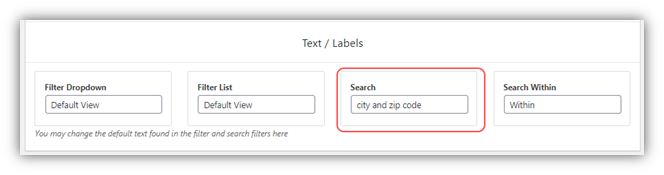
Below is an example of a modified search description:
